I only started documenting my obstacles for this project near the end of it. Nevertheless, you can see that I struggled quite a bit.
Apr 9, 2026
Placing Breakpoints
The code I added myself wasn’t working, so I made a separate project to test the code from this ControllersTech tutorial
After MX_I2C1_Init() in main.c
The I2C handle was initialized properly, and there were no error codes, so the issue probably wasn’t coming from the I2C peripheral on the STM32.
Inside BMP180_Start() in BMP180.c
The code was able to enter the BMP180_Start function.

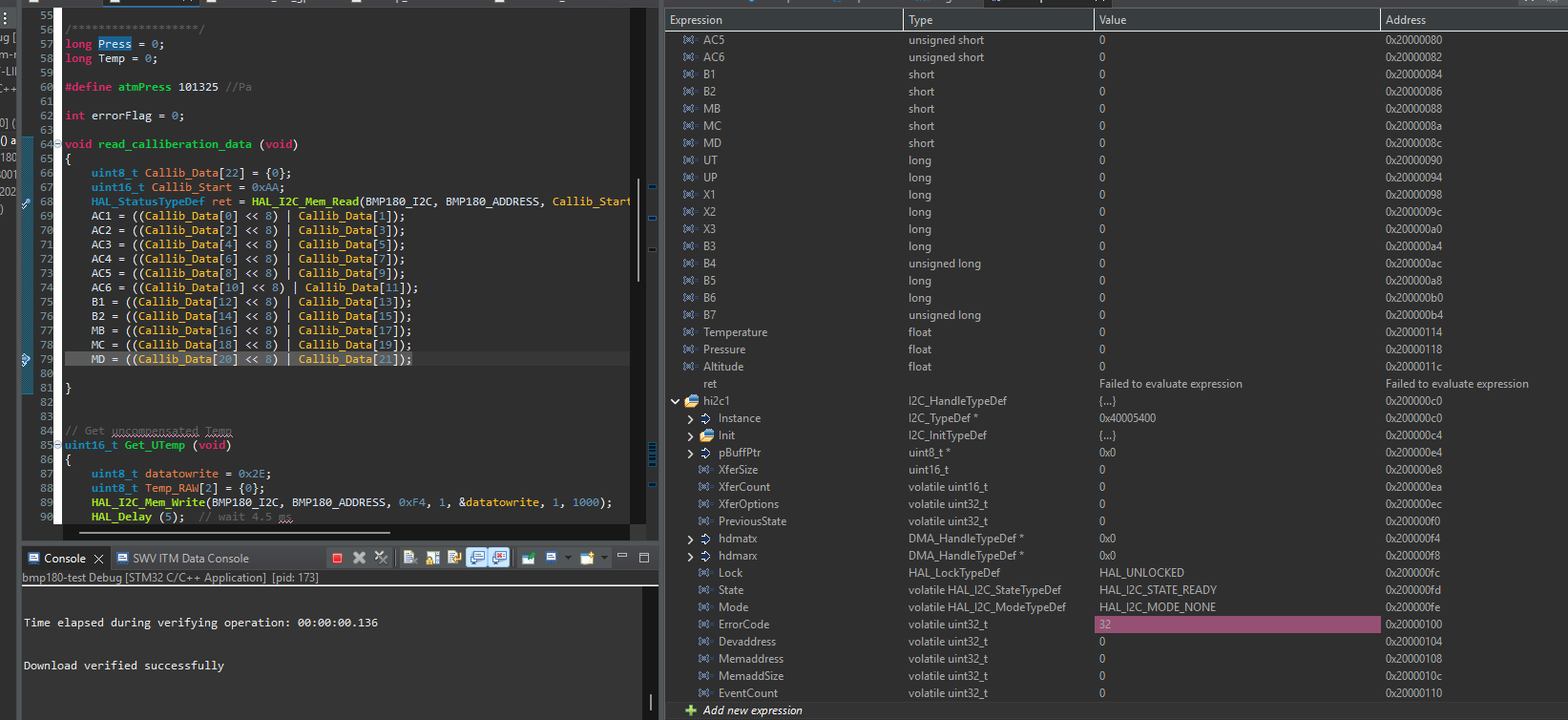
After HAL_I2C_Mem_Read in read_calliberation_data()
After running HAL_I2C_Mem_Read, the I2C handle had an error code of 32, which means there was an acknowledge failure.

The BMP180 wasn’t sending back the acknowledge data.
Debugging the BMP180 Connection
I2C Address
I set it as 0xEE, which matches the datasheet.
Wiring and Power
- Correct pins: I had SDA on PB7 and SCL on PB6 in the .ioc file. I double checked the circuit and those were fine. I also made a simple LED circuit where I set those pins to GPIO output, and that confirmed they were the correct pins.
- Power and ground: I connected the LED circuit and touched it to the VIN and GND pins on the sensor and the LED worked fine. I also tried the LED circuit on the breadboard pins that I was using for the BMP180 and that also worked fine.
I2C Scan
This function wasn’t able to find the sensor.
void I2C_Scan(I2C_HandleTypeDef *hi2c) {
    char msg[32];
    for (uint8_t addr = 1; addr < 127; addr++) {
        if (HAL_I2C_IsDeviceReady(hi2c, addr << 1, 1, 10) == HAL_OK) {
            sprintf(msg, "I2C device found at 0x%02X\r\n", addr);
            HAL_UART_Transmit(&huart2, (uint8_t*)msg, strlen(msg), 100);
        }
    }
}
I also tried both fast (400kHz) mode and standard (100kHz) mode for I2c, but it was still getting the ACK error.
Apr 8, 2026
- Failed to evaluate expression for BMP180
Mar 31, 2026
- Configured PWM to change brightness proportional to voltage. LED was flickering
Mar 26, 2026
- Accidental git restore .
- Couldn’t figure out why updated outputs weren’t printing. Had to clean the project
- Running code before uart was initialized
- Watchdog task was logging all the health flags, causing the alarm task to not turn on the LEDs. Could be due to filling up the UART queue, causing the watchdog task to block.
- Not receiving any data from the BMP180. Changed pins to GPIO to turn on LEDs and pins seem to be working fine
- Was reading pinout upside down so connected to wrong pin.
- Had correct prescaler and period but not the right frequency, so didn’t show pulsing LED; LED was just staying on
Mar 24, 2026
- Only the default task was printing to the putty terminal. Put breakpoint into MX_FREERTOS_Init(). osThreadNew() valid handle for default task but NULL for the other ones. Not enough memory for the statically allocated buffer for the task.
- Control Block (TCB): memory to manage the task’s state, stack pointer, and priority
- Forgot to create the queue and mutex; made the handles but didn’t call the functions to create them
- Did not know that tasks are not allowed to return in FreeRTOS
- Multiple tasks trying to use the same UART handle messing up the terminal prints
Mar 18, 2026
- Did not know that you can compile in the STM32 IDE without the board attached.
- Forgot to create the threads, so nothing was running.
- Forgetting to define extern variables after declaring them
Mar 14, 2026
- Use bit shifting instead of pow() from math.h.
Mar 13, 2026
- Was using large breadboard. Forgot that the power rails don’t run across the entire breadboard. VIN and GND of the BMP180 were connected to the half of the breadboard that wasn’t connected to the STM32.
- Wrote BMP180 calibration function. Was trying to test it but forgot to call it in main.